I moved my NVMe from the M.2_1 slot to M.2_2 to free up two SATA ports for more drives. Powered the box back on. Proxmox booted fine. Containers came up. Web UI worked locally. Internet was gone.
The fix took an hour because the failure was three independent things stacked on top of each other, and only the bottom layer pointed at the actual cause.
what I saw first
ping 8.8.8.8 from the Proxmox host: no route to host. Containers couldn't reach anything outside the box. From my laptop on the same network, I could still SSH into Proxmox and load the web UI, so the host had a working IP on the LAN, but the box itself thought the world ended at its own NIC.
ip route showed the default gateway was set correctly. ip addr showed vmbr0 with my static IP. Looked like networking should work.
The first weird thing: vmbr0 had a different MAC address than I remembered. I keep a few notes on each interface's hardware address, partly for DHCP reservations, partly for paranoia. The MAC on the bridge wasn't the one I had written down. It was a randomly generated address that started with 02: (the locally-administered bit, which is what Linux picks when it has to invent a MAC).
A bridge that invented its own MAC means the bridge has no slave interfaces. Bridges normally inherit the MAC of their first slave. If there's no slave, the kernel makes one up.
why the bridge had no slave
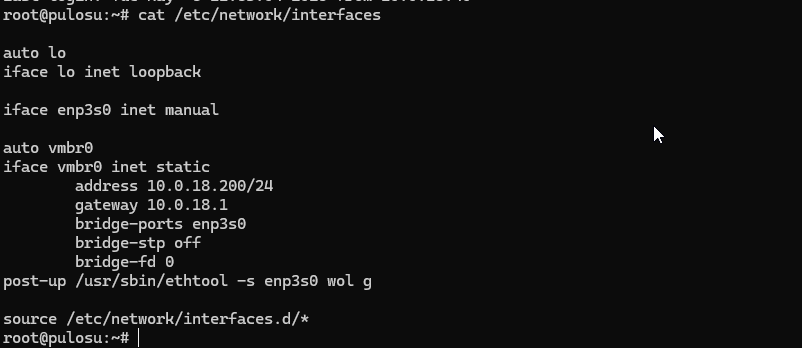
/etc/network/interfaces had the original config:
auto vmbr0
iface vmbr0 inet static
    address 10.0.18.10/24
    gateway 10.0.18.1
    bridge-ports enp4s0
    bridge-stp off
    bridge-fd 0
bridge-ports enp4s0. The bridge expected an interface called enp4s0 to attach to. ip link showed no such interface. There was an enp3s0 instead, with my actual NIC behind it.
Linux derives predictable interface names from the PCI bus topology. enp4s0 means "ethernet, PCI bus 4, slot 0." Move a card to a different physical slot and the bus number changes. My NIC was now on bus 3 instead of bus 4 because the M.2 slot I'd moved the NVMe into shared a controller path with the slot that had been giving the NIC its previous bus number.
Predictable interface names are predictable in the sense of "deterministic given the same hardware layout." The moment you change the layout, the names move with the hardware. This is mostly a feature (the name follows the physical port) and occasionally a curse (config files referencing the old name break silently).
The bridge config still said enp4s0, the kernel created vmbr0 as requested, but the bridge had nothing to attach to. The kernel didn't error. It just made a bridge with no slaves and gave it a random MAC. From that point onward vmbr0 was a bridge in name only: it had an IP address but no path to physical hardware, so packets had nowhere to go.
the fix
Two options here, depending on how much resilience you want.
Option 1, minimal change. Edit /etc/network/interfaces, change bridge-ports enp4s0 to bridge-ports enp3s0, restart networking:
ifreload -a
This works until the next time you rearrange PCI cards. Then it'll break again the same way.
Option 2, more resilient. Pin the interface name to the MAC address using a systemd link file. Create /etc/systemd/network/10-lan.link:
[Match]
MACAddress=aa:bb:cc:dd:ee:ff

[Link]
Name=lan0
Replace the MAC with your actual NIC's MAC (ip link show tells you), and change bridge-ports enp4s0 in your interfaces file to bridge-ports lan0. Now the interface is named after its hardware identity, not its bus position, and the bridge config is stable across hardware moves.
I went with Option 2 because the whole storage rebuild was making me allergic to fragile configs.
the part that took the longest
I knew within five minutes that vmbr0 had no slave. I knew within ten that enp3s0 existed where enp4s0 used to. The hour was spent on a separate problem: I'd assumed the random MAC was a Proxmox bug, spent twenty minutes searching for "vmbr0 random MAC after upgrade," and only after all that occurred to me to check whether the bridge's slave interface actually existed.
The lesson, again, is that error messages don't always point at the proximate cause. A bridge with a random MAC is a symptom of a bridge with no slaves. A bridge with no slaves is a symptom of an interface that got renamed. The interface got renamed because the PCI bus changed. The PCI bus changed because I moved an M.2 card.
Each layer has its own logic and refuses to know about the others. That's mostly fine when systems are working. When something breaks, you have to walk down the layers yourself.
small lessons
The MAC address being wrong was the first useful clue. Worth getting into the habit of noting MAC addresses for any interface that matters: bridges, your main NIC, anything you've configured DHCP reservations for. When something looks weird, comparing MACs to your notes catches a class of problems quickly.
ip link is more honest than ip addr for diagnosing interface-existence problems. ip addr shows you what's configured, which makes a missing interface easy to miss because you scan for the IP and find it. ip link shows you what physically exists, which makes an absence obvious.
ifreload -a (Debian/Proxmox) reapplies /etc/network/interfaces without rebooting. Useful when you're iterating on bridge configs over SSH, although risky because if you break things you might lose the SSH session you're working from. Have console access ready before you start playing with the network config of a remote machine.
what didn't help
I spent some time wondering if the kernel had upgraded itself during the boot and changed naming conventions. It hadn't. I checked /etc/default/grub for net.ifnames=0, which would disable predictable naming entirely and revert to eth0. It wasn't there. I checked dmesg for renamed-interface messages and found exactly one (enp3s0 was the new name) but didn't immediately connect that to my interfaces file.
The thing that finally made me check was looking at ip link and noticing that enp4s0 simply wasn't in the list. I'd been looking at IP-level state too long. Going down to the link layer was what unstuck it.
what I'd tell past me
If your Linux box loses network connectivity after any hardware change, before anything else: run ip link and check that every interface named in /etc/network/interfaces actually exists. That single check would have saved most of the hour. The rest of the diagnosis is interesting in retrospect, but it's all downstream of "the interface got renamed and nothing told me."
Pin interface names to MAC addresses if you ever rearrange PCI cards. The cost is one tiny file. The benefit is your network config doesn't care which slot anything is in.
And keep a console cable ready. Network config changes over SSH are a rite of passage, but they're easier when you have a way to recover.