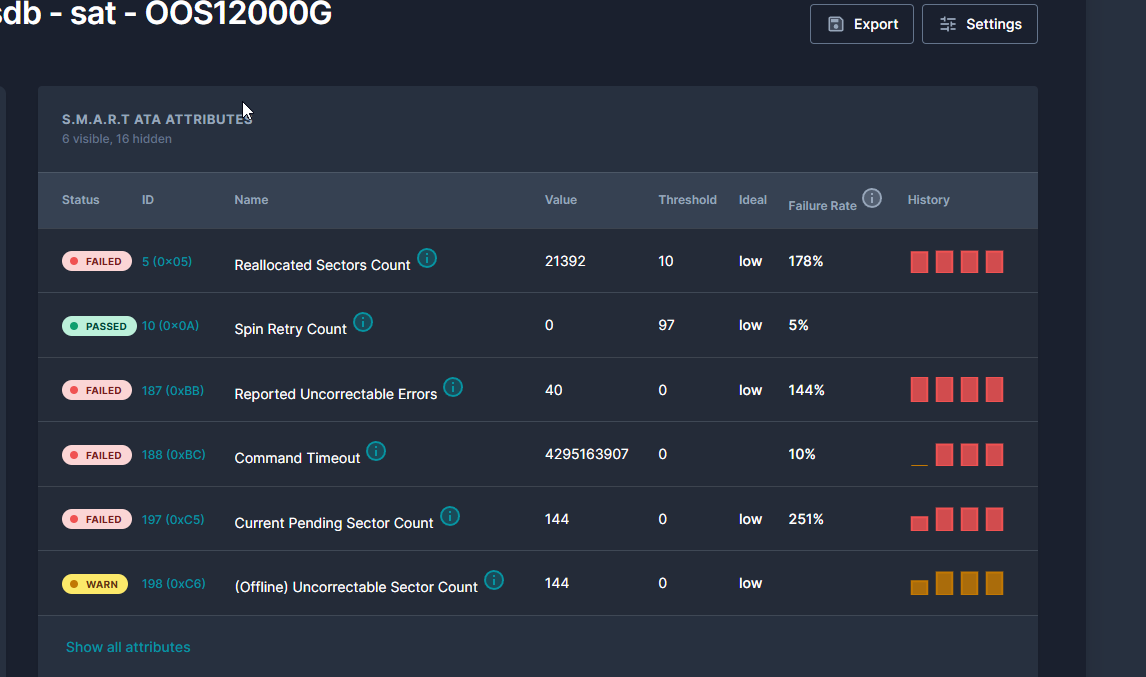
Got this drive on marktplaats, it came out of an old NAS, no warranty, no provenance, just "see if it's any good." I plugged it in, the Proxmox UI marked it PASSED, and I would have happily started using it if Scrutiny next to it hadn't said FAILED
what each tool told me
Proxmox's PASSED reads the drive's own self-assessment. Modern HDDs run a built-in self-test and report a single bit back: passing or failing. That bit only flips when the drive itself thinks it's about to die. Most failing drives never get that bit set, because firmware is conservative and the drive would rather lie to you than fail an enterprise customer's nightly health check.
Scrutiny reads the actual SMART attributes (the same numbers Proxmox shows if you click into the disk) and runs them through Backblaze's research on which attributes correlate with failure. Backblaze has run hundreds of thousands of drives and published which SMART values predict death. Scrutiny just applies their thresholds.
So when Proxmox says PASSED and Scrutiny says FAILED, both are correct. The drive doesn't think it's dying. The statistics say it absolutely is.
I pulled up the raw values:
| Attribute | Value |
|---|---|
| Reallocated_Sector_Ct | 20,752 |
| Current_Pending_Sector | 88 |
| Offline_Uncorrectable | 88 |
| Reported_Uncorrectable_Errors | 40 |
| UDMA_CRC_Error_Count | 15,624 |
| Power_On_Hours | 10,239 |
20,752 reallocated sectors. That's the count of sectors the drive has already written off as bad and remapped to spare blocks. Healthy drives have zero or a small handful. 20k means the platter has been shedding sectors for years.
88 pending sectors means there are 88 places on the disk right now where the firmware tried to read data, failed, and is waiting for the next read or write attempt to either succeed or definitively give up and remap the location. They're sectors in limbo.
Offline_Uncorrectable matching pending at 88 is the same thing reported through a different lens: 88 sectors that ECC can't recover.
40 reported uncorrectable errors over the drive's life. These are reads that even with all the error correction in the world came back as garbage data. If anything important had been on those sectors, it's gone.
The drive thinks it's fine because none of these counts have crossed the manufacturer's threshold (in the SMART output, the VALUE column was 95 with a threshold of 10, so technically still way above the line). Backblaze's research says you don't wait for the manufacturer's threshold. You watch the trend.
refresh attempt
There's a folk remedy for drives in this state: write zeros to every sector. The theory is that pending sectors are sectors the drive can't read but might still be physically usable. Writing to them gives the drive a chance to either succeed (and clear the pending count) or definitively fail (and remap to a spare). Either way, pending should go to 0.
I ran a dd if=/dev/zero of=/dev/sdb bs=4M status=progress and let it churn for sixteen hours. 12 TB of zeros at a sustained 217 MB/s, which itself was a positive sign. Failing drives tend to slow to single-digit MB/s when they hit bad regions because the firmware is busy retrying reads. This one held its speed.
Halfway through I checked SMART. Nothing had changed. Reallocated still at 20,752, pending still at 88. That was suspicious but not yet damning. Drives sometimes wait until the end of a write pass before doing reallocation bookkeeping.
When dd finished, I checked SMART again.
| Attribute | Before | After |
|---|---|---|
| Reallocated_Sector_Ct | 20,752 | 20,840 |
| Current_Pending_Sector | 88 | 144 |
| Offline_Uncorrectable | 88 | 144 |
Reallocated went up by 88. Exactly the number of pending sectors at the start. So the firmware did remap the original 88 pending sectors during the write pass. That part worked.
But pending wasn't 0. It was 144.
The drive had discovered 56 new bad sectors during a full surface zero-write. Sectors that the firmware tried to write to and couldn't verify. That's a much worse failure mode than the original pending count. The original 88 were sectors the drive couldn't read; some of those were transient, and the wipe cleared them. The 144 are sectors the drive can't write reliably right now. The platter region is physically damaged and the firmware can't finish the operation it was asked to do.
I checked SMART one more time, ten minutes later, with no I/O happening. Reallocated had drifted up another 8. The drive was still degrading sitting at idle. That is not a useful drive.
whats up
Three things, mostly.
First, the Proxmox PASSED indicator is worse than useless because it gives you false confidence. A drive can be actively shedding sectors during normal use and still report PASSED because the manufacturer set a generous threshold. If you have a Proxmox host, install Scrutiny. It runs as a Docker container, scrapes SMART every few hours, and shows you the actual attribute trends. It will warn you weeks before the manufacturer's threshold trips.
Second, the dd zero-fill trick works for one specific kind of damage and doesn't work for another. If your drive has pending sectors from transient read errors (cosmic rays, weak magnetic regions), zero-fill will clear them. If your drive has progressive platter damage, zero-fill will accelerate the failure by surfacing more bad regions. There is no way to tell ahead of time which one you have. The wipe is also the test.
Third, ECC and error correction in modern drives is so aggressive that you will be deceived for a long time before things break visibly. The Hardware_ECC_Recovered counter on this drive was at 104 million by the end. That means 104 million times, the raw bits coming off the platter were corrupted, and the drive's error correction code reconstructed them. Most of those reconstructions were probably perfect. Some weren't. You have no way of knowing which files contain silently corrupted data until you try to read them and discover something has changed.
This is most of why I want a ZFS mirror for anything I care about. ZFS checksums every block on read. If the drive returns data that doesn't match the checksum, ZFS knows immediately and (in a mirrored setup) reads the good copy from the other drive. Without that layer, you're trusting the drive's ECC to never lie to you, and modern drives lie occasionally because they have to.
I'll keep it
The drive lives on as a "broken backups" experiment, partitioned half ext4 and half a ZFS pool, both intentionally treated as throwaway. The plan is to write known data to both halves, run scrubs over time, and watch the failure modes diverge.
ZFS will catch the bit rot loudly. Ext4 will return corrupted bytes silently. That difference is the entire reason ZFS exists, and watching it happen on a known-bad drive is genuinely useful experience that you can't easily get any other way.
A failing drive is a useful drive, as long as you know it's failing.