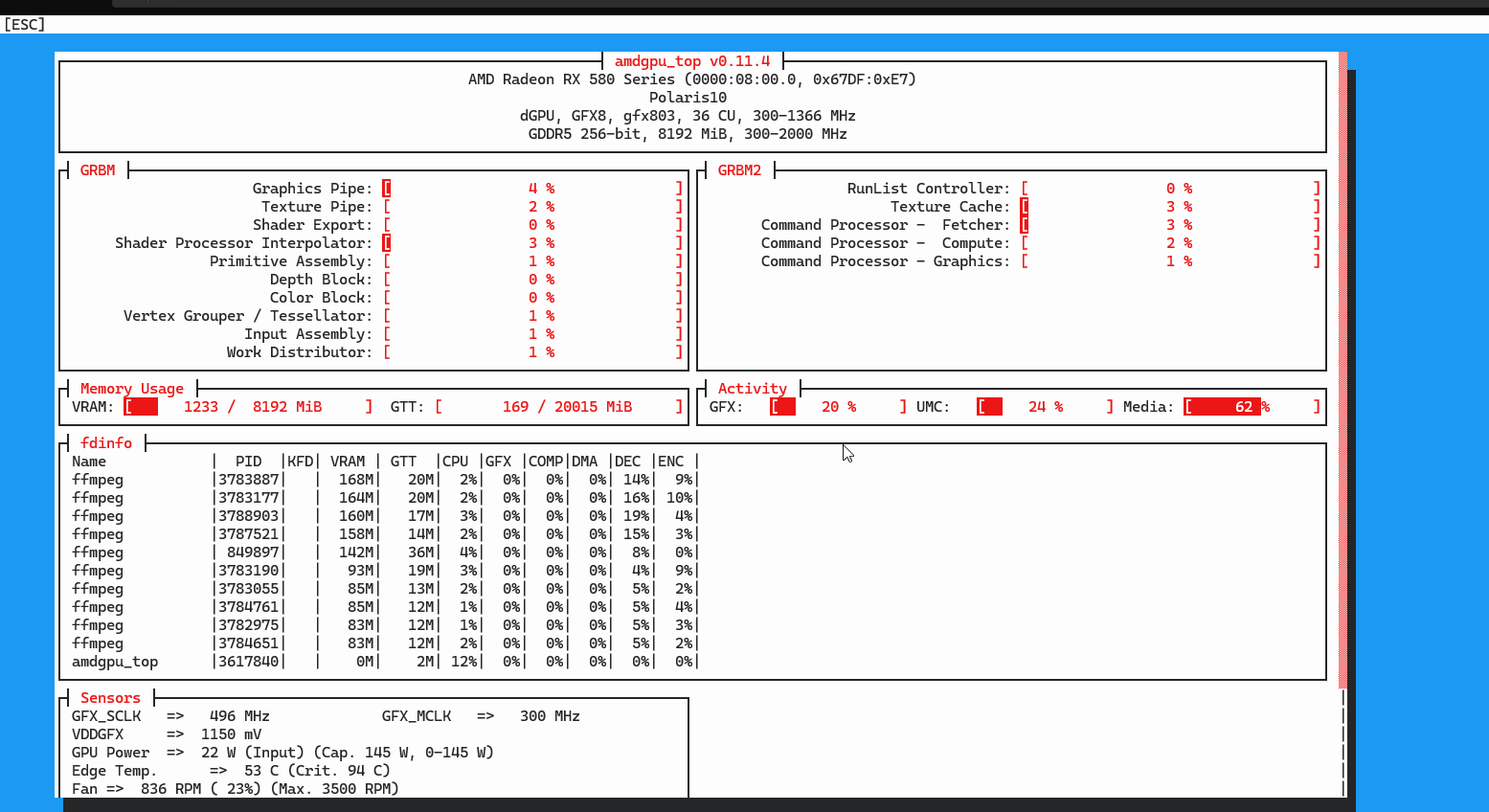
I have one GPU in my Proxmox host (an old RX 580 that used to live in my gaming PC) and three services to use it for hardware video acceleration: Frigate decodes my securitycamera, Jellyfin transcodes movies for clients that can't play natively, Immich generates thumbnails and transcodes versions of uploaded videos. All three run inside Docker. Docker runs inside an unprivileged LXC. The LXC runs on Proxmox.
Getting a video device through three layers of containerization, with permissions intact took a bit. The fix is mechanical once you understand what's happening, but the diagnostic phase is full of small confusions. Writing it down here so I don't have to figure it out again.
what the layers look like
Proxmox host
└── /dev/dri/card1, /dev/dri/renderD128       (the actual GPU device nodes)
    └── unprivileged LXC 1337 (Docker host)
        └── /dev/dri/card1, /dev/dri/renderD128  (bind-mounted from host)
            └── Frigate, Jellyfin, Immich       (Docker containers)
                └── /dev/dri/renderD128           (passed as a Docker device)
Each arrow is a place where permissions can break. And because the LXC is unprivileged, every layer has its own opinion on what user IDs and group IDs mean.
the unprivileged LXC problem
Unprivileged LXCs map UIDs and GIDs from the container into a higher range on the host. By default, the mapping is "container UID 0 maps to host UID 100000, then add 65535 more in order." So the container's root user is host UID 100000, the container's user 1000 is host 101000, and so on. This is great for security (a process escaping the container as root is just an unprivileged user 100000 on the host) and terrible for sharing devices (the device on the host is owned by root:render with the host's render group GID, but inside the container that GID isn't mapped to anything meaningful).
The /dev/dri/renderD128 device on my host is owned by root:render, with the render group having GID 993 (Debian 13's default). Inside the unprivileged LXC, GID 993 doesn't map to anything because the default idmap doesn't include host GID 993 in its range. So even if the device passes through, no user inside the container can read it.
You fix this by punching a hole in the idmap.
the lxc config
In /etc/pve/lxc/1337.conf I added these lines:
# device passthrough
lxc.cgroup2.devices.allow: c 226:* rwm
lxc.mount.entry: /dev/dri dev/dri none bind,optional,create=dir

# idmap with holes for video (44) and render (993 on host -> 992 in container)
lxc.idmap: u 0 100000 65536
lxc.idmap: g 0 100000 44
lxc.idmap: g 44 44 1
lxc.idmap: g 45 100045 947
lxc.idmap: g 992 993 1
lxc.idmap: g 993 100993 64543
Reading the idmap top to bottom:
u 0 100000 65536is the standard user mapping, untouched. Container UID 0 to 65535 maps to host 100000 to 165535.g 0 100000 44maps container GIDs 0 through 43 to host 100000 through 100043. Standard.g 44 44 1is the first hole. Container GID 44 maps to host GID 44 (video group on both). Now any container process in group 44 can access video devices on the host.g 45 100045 947resumes the standard mapping for GIDs 45 through 991.g 992 993 1is the second hole, and the interesting one. Container GID 992 maps to host GID 993. This is asymmetric on purpose.g 993 100993 64543resumes the standard mapping for the rest.
The two numbers being different (992 in container, 993 on host) was the part that took me a while to figure out. The host's render group is 993. Inside my Ubuntu container, GID 993 was already taken by the kvm group, and GID 992 is what Ubuntu uses for render. If I'd mapped 993 to 993 directly, the device would have appeared inside the container owned by group kvm, which is harmless but confusing every time I ran ls. By cross-mapping 992-in-container to 993-on-host, the device shows up labeled render in both places, even though the underlying GID number differs across the boundary.
The idmap math has to sum to exactly 65536. If you get it wrong, the LXC won't start and the error message is useless. The arithmetic for my config: 44 + 1 + 947 + 1 + 64543 = 65536. If you change the hole positions, recompute the gaps.
/etc/subgid also needs to permit root to use the host GIDs you're cross-mapping into:
root:44:1
root:993:1
Without these the LXC silently fails to start with a generic permission error.
docker compose for each service
With the LXC happy, each Docker service needs to be told about the device and the groups. The pattern is the same for all three:
services:
  jellyfin:
    devices:
      - /dev/dri:/dev/dri
    group_add:
      - "44"      # video
      - "992"     # render (in-container GID)
The group numbers are the in-container GIDs (so 992 for render, not 993). Docker passes them through as supplementary groups for the container's main process. Always use numeric GIDs in compose files, not group names. Names get resolved per container, and Linuxserver.io images sometimes have totally different naming conventions internally.
For Frigate, just renderD128 is enough. For Jellyfin, both card1 and renderD128 because Jellyfin uses card1 for some HDR tone mapping operations. The simpler approach is to bind-mount the whole /dev/dri directory, which gives every service everything in it.
For Immich specifically, also set LIBVA_DRIVER_NAME=radeonsi in the environment block. Without it, Immich's ffmpeg defaults to a different driver and falls back to CPU silently.
verifying it actually works
The classic mistake is to do all this configuration, see no error messages, and assume it's working. Hardware acceleration in ffmpeg fails open: if VAAPI initialization fails, ffmpeg uses CPU and never tells you. You have to check.
Inside any of the containers:
vainfo --display drm --device /dev/dri/renderD128
A working setup prints a list of supported codec profiles. The RX 580 (Polaris) gives you H.264 and HEVC encode and decode, plus a few others. A broken setup prints "no driver found" or fails outright.
In a separate terminal during transcoding:
lact cli stats
GPU clockspeed should jump from idle (around 300 MHz on a Polaris) to several hundred MHz when work arrives. VRAM usage will climb modestly (a couple hundred MB per concurrent stream). If clocks stay flat at idle while transcoding is supposedly happening, ffmpeg is using CPU and the hardware path isn't actually engaged.
For Frigate specifically:
docker logs frigate 2>&1 | grep -i vaapi
You're looking for a line like Automatically detected vaapi hwaccel for video decoding. If you see that, Frigate's auto-detection picked up the device. If not, your devices block or group_add is wrong.
one thing that confused
CPU usage in btop will still look high even with VAAPI working perfectly. ffmpeg with hardware acceleration still uses CPU for everything that isn't the codec itself: container demuxing and muxing, audio processing, color space conversion between CPU and GPU memory, packet timing, disk I/O. A "hardware accelerated" transcode is realistically 60 to 80 percent GPU and 20 to 40 percent CPU.
If you're transcoding three streams in parallel, the CPU cost stacks up fast. On a Ryzen 5 1600 with three concurrent Immich transcodes, I saw load average climb to 14 even though the GPU was clearly doing the codec work. That's expected. The GPU saved me from CPU saturation, it didn't eliminate CPU use.
If you want to stop guessing, turn VAAPI off in your service's config, run a transcode, watch CPU spike to 100% on multiple cores while GPU sits idle. Turn VAAPI back on, repeat, see CPU drop and GPU clocks jump. That direct comparison is the only way to be certain the hardware path is actually engaged.
love this
One physical GPU, three services, two containerization layers. The LXC config is fifteen lines, each compose file gets two extra blocks, and the whole thing survives reboots and Proxmox upgrades. Once you understand what each line does, the configuration is tight and it stays tight.
The annoying part is that none of this is well-documented in one place, and the failure modes are mostly silent fallbacks. You can run the whole stack thinking GPU acceleration is working when it's actually been on CPU the entire time. The verify step is the only honest answer.