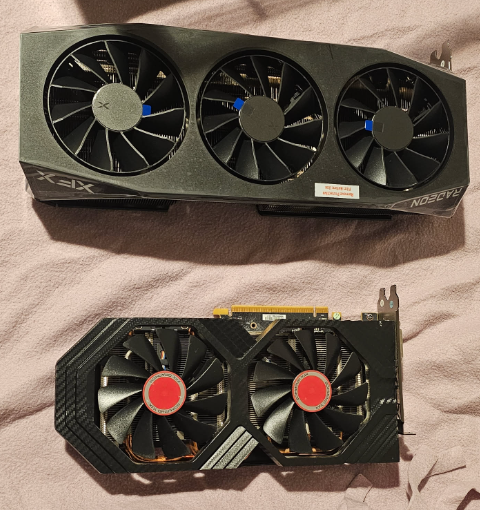
I have an RX 580 from 2017 sitting in my Proxmox host. It used to be in my gaming PC. When I upgraded to a 9070 XT, the 580 came with me to the homelab box because I had the slot and it was free. I assumed it'd be useful for hardware video acceleration in Frigate and Jellyfin and that'd be the end of it.
Turns out there's more it can do, and also a lot it pretends it can do but can't really. This is what an eight-year-old AMD card looks like in 2026.
what works: VAAPI
Hardware video decode and encode through VAAPI works perfectly on Polaris. This is the win. The RX 580 has a dedicated UVD/VCE block (Video Codec Engine, AMD's name for the silicon that does H.264 and HEVC encode/decode in hardware), and that block is what Frigate, Jellyfin, and Immich talk to when they ask for hardware acceleration.
vainfo inside any of those containers reports a clean list of supported profiles:
VAProfileH264ConstrainedBaseline: VAEntrypointVLD     (decode)
VAProfileH264ConstrainedBaseline: VAEntrypointEncSlice (encode)
VAProfileH264Main:                VAEntrypointVLD
VAProfileH264Main:                VAEntrypointEncSlice
VAProfileH264High:                VAEntrypointVLD
VAProfileH264High:                VAEntrypointEncSlice
VAProfileHEVCMain:                VAEntrypointVLD
VAProfileHEVCMain:                VAEntrypointEncSlice
VAProfileHEVCMain10:              VAEntrypointVLD
VAProfileMPEG2Simple:             VAEntrypointVLD
VAProfileMPEG2Main:               VAEntrypointVLD
VAProfileVC1Simple:               VAEntrypointVLD
VAProfileVC1Main:                 VAEntrypointVLD
VAProfileVC1Advanced:             VAEntrypointVLD
VAProfileJPEGBaseline:            VAEntrypointVLD
VAProfileNone:                    VAEntrypointVideoProc
H.264 and HEVC encode and decode, plus all the older codecs you'd want. No AV1 (Polaris predates AV1 hardware blocks). No VP9 hardware path on this generation (you'd need Vega or later).
Real-world: a single 1080p H.264 stream from my doorbell camera barely registers. The GPU clock idles at 300 MHz and bumps to 460-500 MHz briefly when a frame comes in. Power draw goes from 8 watts at idle to maybe 15 watts when actively decoding. The dedicated decode silicon is so over-spec for one stream that it's basically free.
Three concurrent Jellyfin transcodes (1080p HEVC source, transcoded to 1080p H.264 for an Apple TV) saturate the encoder block. The encoder can only physically encode one frame at a time, so concurrent jobs serialize on the hardware encoder while the rest of ffmpeg's pipeline runs in parallel on CPU. GPU utilization sits around 45% for the media engine, with brief spikes higher. Watching three movies on three devices at once is fine. Eight, probably not.
For Polaris specifically, the codec block is more capable than people give it credit for. The marketing focused on gaming when the card launched, and the video silicon has aged better than the shaders have.
the part that surprises people
CPU usage stays high even when VAAPI is working. The hardware acceleration only handles the codec itself (the H.264/HEVC encoding and decoding math). Everything else stays on CPU: container demuxing, audio resampling, color space conversion between CPU memory and GPU memory, packet timing, file I/O.
A "hardware accelerated" transcode is realistically 60-80% GPU and 20-40% CPU. If you turn off VAAPI you'd see CPU jump to ~100% on multiple cores while GPU sat idle. With VAAPI on, CPU drops significantly but doesn't go to zero. People sometimes look at htop, see ffmpeg using a lot of CPU, and conclude that hardware acceleration isn't working. It is. It's just doing the codec part, which is the most expensive part, and the rest of ffmpeg's pipeline is the rest.
The way to verify the hardware path is engaged is to compare directly: run a transcode with VAAPI off, watch CPU and GPU. Run the same transcode with VAAPI on, watch CPU drop and GPU clocks rise. The difference is the proof.
what doesn't work: ROCm
ROCm is AMD's CUDA-equivalent. It's the framework that lets you run PyTorch, TensorFlow, ONNX Runtime, and other ML libraries on AMD GPUs. Officially, AMD dropped support for Polaris (GFX803) in ROCm 4.x, around 2020. They want you to buy a 7000-series card.
The drivers and runtime libraries didn't disappear. The GFX803 binaries are still in modern ROCm releases. AMD just stopped certifying that the combination works, stopped fixing bugs that affect Polaris specifically, and stopped advertising support. There's a community workaround that revives it: set HSA_OVERRIDE_GFX_VERSION=8.0.3 in the container environment, and ROCm will load the GFX803 binaries that are technically still shipped. Plus a few other environment variables to disable optimizations that break on Polaris.
I tried this for Immich, which uses ONNX Runtime for face detection and CLIP embeddings (smart search). The ONNX runtime ROCm execution provider exists and can run on Polaris with the override, but:
- The ROCm container image is 8+ GB
- Building a custom Immich ML image with all the right pieces takes a couple of hours
- The configuration is fragile (one wrong env var and it falls back to CPU silently)
- Polaris is reportedly unstable under sustained ROCm load, with occasional GPU hangs that require a host reboot
- The performance gain on a small library is marginal
For my actual photo library size (a few thousand photos), CPU ML on a Ryzen 5 1600 at concurrency 7 takes ~0.2% CPU per concurrent job and finishes the initial pass in maybe an hour. By the time I finished setting up ROCm, the CPU pass would have already been done.
So I didn't pursue it. Worth knowing the option exists if you have a much larger library (50k+ photos) where the initial indexing genuinely takes overnight on CPU. For smaller libraries, the engineering effort isn't justified.
OpenCL, briefly
OpenCL is AMD's older general-compute API. Mesa Clover (the open-source OpenCL implementation) supports Polaris natively, no HSA hacks needed. clinfo reports the device cleanly. The problem isn't OpenCL itself, it's that nothing modern ML uses OpenCL anymore. ONNX Runtime dropped OpenCL years ago. PyTorch never supported it well. TensorFlow's OpenCL support was always experimental and is now abandoned.
If you have a custom ML workload that you're writing yourself, OpenCL on Polaris is fine. If you're trying to plug an old AMD card into a modern off-the-shelf ML stack, OpenCL is a dead end.
what's useful
Where the RX 580 earns its keep in 2026:
Frigate, hwaccel for stream decoding. Light load, very efficient, idles when there's nothing to do. The card uses ~8W at idle and rarely climbs above 25W even under sustained decoding.
Jellyfin, hwaccel for transcoding. The encoder block can handle 4-8 simultaneous 1080p H.264 streams comfortably. For HEVC encode the throughput drops a bit but is still solid. People with large family Plex/Jellyfin setups get a lot out of an old Polaris card here.
Immich, hwaccel for video transcoding. Same as Jellyfin. The initial library transcoding pass after enabling hwaccel is fast: a few hundred videos process in maybe an hour.
Display output for the host. Sometimes you want to plug a monitor into the Proxmox box for emergency access. Having a GPU there means you can. The 580 was massive overkill for this use, but it's there.
What it's not earning its keep on:
ML inference. The setup cost outweighs the runtime benefit for a personal-scale homelab. CPU is fine for a few thousand photos.
Game streaming via Sunshine/Moonlight. Polaris's NVENC-equivalent is good enough for video streaming but not great for low-latency game streaming. RDNA-and-later cards do this much better. Possible on Polaris, just not great.
Anything that needs more than 8 GB VRAM. The RX 580 8GB I have is fine for most uses. The 4GB variant would already be tight for VAAPI plus any other workload.
honest take on old GPUs in homelabs
A lot of homelab content treats old GPUs as universally useful. They're not. They're useful for specific things, mostly video.
If you have an RX 580 (or 570, or Vega, or any other Polaris-era AMD card) lying around and you want to use it in a homelab box, the realistic plan is: VAAPI for video stuff (which is great), and skip the rest. ROCm-on-Polaris is a museum exhibit you visit on a weekend, not a production tool. Modern ML wants modern hardware, and that's just the cost of using modern ML.
The card cost me nothing because I already had it. If I were buying a card specifically for homelab use, I wouldn't buy a Polaris card today: a low-power Intel Arc A310 or a used GTX 1660/A2000 would do everything Polaris does for video, plus more for other workloads, with better idle power. But if you have one already, it earns its slot for the video work alone, even in 2026.