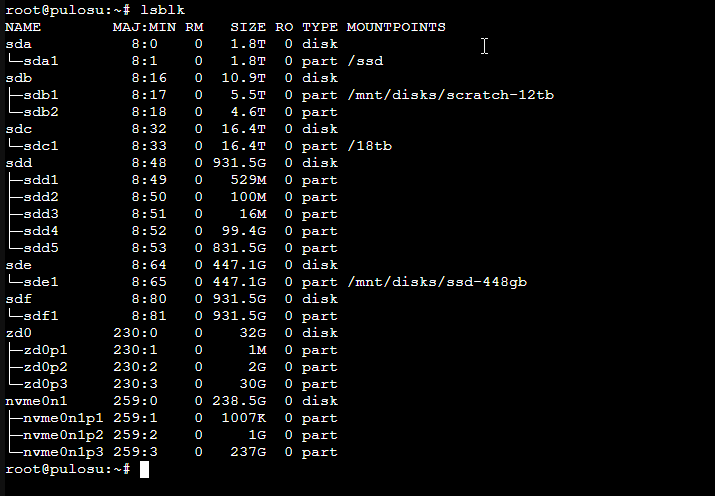
The Proxmox host I've been running since 2023 grew its storage organically. New drive comes in, gets an ext4 partition, gets mounted at /ssd or /18tb, gets bind-mounted into whichever LXC needs it. Worked fine for a while. Then I added more drives, the existing layout stopped scaling, and I started making bad decisions to keep things working.
Time for a rebuild. This post is mostly about the thinking (what each tier is for, why I picked the filesystems I picked, what I left out) rather than the commands. Commands are easy to look up. Knowing what to put where is the part that took me longer than I wanted.
the inventory
What's physically in the box:
| Drive | Size | Role |
|---|---|---|
| WD SN520 NVMe | 256 GB | Proxmox boot, ZFS root pool, LXC subvols |
| Samsung 870 QVO | 2 TB | Primary backup target |
| Seagate Exos | 18 TB | Bulk media + Frigate recordings |
| Seagate Barracuda | 12 TB | Failing drive, kept as a learning lab |
| Some no-name | 480 GB | Docker data root, transcode cache, swap |
| Seagate Barracuda | 1 TB | Reserved for ZFS mirror |
| Seagate Barracuda | 1 TB | Reserved for ZFS mirror |
That's six drives plus the boot NVMe. Each one has a job, and the job is what determines how it gets formatted and mounted.
whats wrong
The old layout had two top-level mount points: /ssd for the 2 TB SATA SSD and /18tb for the Seagate. Both ext4. Both mounted by /dev/sdX device names. Both bind-mounted into LXCs by adding mp0: /ssd,mp=/ssd lines to LXC configs.
Three problems with this:
Device names are unstable. I added two more SATA drives during the rebuild, and the kernel reassigned letters. The drive that was /dev/sda became /dev/sdc. Anything in fstab referencing /dev/sda1 was now mounting the wrong filesystem. I caught it because the system rebooted into a half-working state. UUIDs solve this and have always been the right answer; I just hadn't bothered.
The naming scheme didn't reflect purpose. /ssd told me nothing about what was on the SSD. /18tb told me nothing about whether the 18 TB drive held media or backups or both. After two years I'd forgotten what was where. Renaming everything at once meant updating LXC configs, Proxmox storage definitions, fstab, and any application that hard-coded the old paths. Painful, but it forced clarity.
Bind mounts were doing too much work. Bind mounts are great for sharing one filesystem across multiple containers (the media library that both Jellyfin and Sonarr need to see). They're terrible as the only way of giving an LXC storage. Per-LXC backups, snapshots, and quotas all want a managed volume per container, not a shared bind mount. I was using bind mounts for everything because that's what I started with, even when the use case had moved on.
the new layout by tier
Three tiers based on speed and durability needs. I picked filesystems per tier rather than per drive.
Tier 1: NVMe ZFS pool, root. This stays as it was. ZFS gives me snapshots of LXC subvols, which I rely on for safe upgrades. The pool is named rpool and holds Proxmox itself plus every LXC's root disk. Every LXC sub-volume lives at rpool/data/subvol-NNN-disk-0. ZFS automatically mounts these as part of starting the container. No fstab entries.
Tier 2: SATA SSDs, mostly ext4. The 2 TB Samsung holds the canonical copy of my backup archives. The 480 GB no-name SSD holds Docker's data root, the transcode cache directory shared by Frigate / Jellyfin / Immich, and a 20 GB swapfile.
ext4 here, not ZFS, because:
- Single-disk ZFS gives you snapshots and checksums but no redundancy. The snapshots are useful but the checksum benefit is mostly wasted on a single disk: you find out about corruption but you can't recover from it.
- ext4 is simpler. No ARC cache eating RAM, no recordsize tuning, no
zfs sendsyntax to remember. - These tiers are fast scratch and replicated backup. If one fails, I rebuild from the other. The ZFS protection model doesn't add much over "have a copy somewhere else."
Tier 3: HDDs, mixed. The 18 TB Exos is ext4 and holds bulk media plus Frigate's continuous recordings. ext4 because: it works, it's been working for a year, and 16 TB of media is too much to evacuate while I refactor.
The two 1 TB Barracudas will become a ZFS mirror once I get to it. That's the tier where redundancy actually matters and where a mirrored pool justifies the ZFS overhead. 1 TB usable from two drives, plus checksums, plus snapshots, plus the ability to lose either drive without data loss. This is what ZFS is for.
The 12 TB Barracuda is the learning specimen. Half ext4 partition, half ZFS pool, both treated as throwaway. (I wrote about that drive separately in the dying 12tb.)
naming convention
Everything moves to /mnt/disks/ with descriptive names:
/mnt/disks/ssd-2tb         Samsung 2TB SSD
/mnt/disks/ssd-448gb       The 480GB no-name SSD
/mnt/disks/hdd-18tb        Seagate 18TB
/mnt/disks/scratch-12tb    The dying 12TB (ext4 half)
ZFS pools live at the root, where ZFS auto-mounts them:
/rpool             NVMe boot pool
/scratch-12tb-zfs  ZFS half of the dying drive
/mirror-1tb        Future ZFS mirror (when I add the two 1TBs)
The naming is <type>-<size> with optional purpose suffix. It's not pretty but it's unambiguous: I can see at a glance what each path represents.
The 12 TB drive I gave it the suffix -zfs to disambiguate from the ext4 half on the same physical disk. If I ever migrate the 18 TB to ZFS, that'd become /hdd-18tb-zfs (replacing the ext4 mount), which keeps the convention consistent.
fstab, finally with UUIDs
Every entry now uses UUIDs instead of /dev/sdX:
UUID=uuidhere  /mnt/disks/ssd-2tb       ext4  defaults,nofail  0  2
UUID=uuidhere  /mnt/disks/hdd-18tb      ext4  defaults,nofail  0  2
UUID=uuidhere  /mnt/disks/ssd-448gb     ext4  defaults,nofail  0  2

# scratch-12tb ext4 half
UUID=uuidhere  /mnt/disks/scratch-12tb  ext4  defaults,nofail  0  2

# swapfile on the 480GB SSD (mounted by path because swapfiles can't have UUIDs)
/mnt/disks/ssd-448gb/swap/swapfile  none  swap  sw 0  0
The nofail flag is important. Without it, a single missing or unhealthy drive prevents the system from booting normally and drops you to emergency mode at the console. With nofail, the system boots and the missing drive shows up as not mounted, which I can fix without driving home to plug in a keyboard.
blkid gives you the UUID for any filesystem. The first time you set this up, write a small script that generates the fstab entries from blkid output: it's faster than copy-pasting and avoids transcription errors.
lane sharing thing
I hit one hardware quirk during the rebuild that's worth flagging because it's not in the obvious places to look.
The motherboard is an ASUS ROG Strix B450-F. It has six SATA ports labeled SATA6G_1 through 6. When I plugged drives into ports 5 and 6, they didn't appear in lsblk. Reseating cables, swapping ports, checking BIOS—none of it helped.
The motherboard manual has a footnote: "When the M.2_1 socket is operating in SATA or PCIE mode, SATA6G_5/6 ports will be disabled." Translation: my NVMe in the first M.2 slot was eating the lanes that would otherwise feed two of the SATA ports.
Two ways to recover the lost ports. Move the NVMe to the M.2_2 slot, which uses different lanes (a footnote elsewhere notes this drops the GPU from x16 to x8, which costs maybe 1-3% in gaming and zero for everything else I do). Or buy a PCIe SATA HBA card and bypass the chipset entirely. I went with the M.2 swap because it's free and reversible.
The networking interface name changed when I moved the NVMe (enp4s0 became enp3s0) because Linux derives interface names from PCI bus numbers, and moving a card changes the bus topology. I had to update /etc/network/interfaces to point the bridge at the new name. Took me a frustrating hour to figure out why my Proxmox host had no internet after the swap. Worth knowing if you ever rearrange PCI cards.
the bind-mount question, settled
For shared data (the media library, the backup directories that multiple containers all read from), bind mounts are still the right answer. One canonical copy on disk, multiple containers see the same files. Snapshots happen at the host level on the underlying filesystem.
For per-container data (a database's storage, MinIO's object pool, anything one service owns exclusively), I'm switching to Proxmox-managed volumes. That means each container gets its own ZFS sub-volume or its own mount-point image file allocated from a registered storage. Per-container backups via vzdump work cleanly because they only touch the container's owned storage. Quotas are enforceable. Snapshots are per-container.
This took rewriting some of my LXC configs. Where I previously had:
mp0: /ssd/cloudpanel-data,mp=/var/data
I now have:
mp0: ssd-2tb-storage:vm-420-disk-0,mp=/var/data,size=20G
Where ssd-2tb-storage is a directory storage I registered in /etc/pve/storage.cfg pointing at the 2 TB SSD. Proxmox creates and manages the disk image; the container sees it as a normal mount.
The bind-mount lines are still there for shared data. Both patterns coexist. The rule is: if more than one container reads it, bind mount it. If exactly one container reads or writes it, allocate a managed volume.
what I left out
I didn't move to a single ZFS pool spanning everything because: the drives are too different in size and speed to make a healthy ZFS pool, the NVMe is already a separate ZFS pool that I'm happy with, and rebuilding the entire system into one giant pool is more risk than benefit for a homelab.
I didn't set up automatic offsite backup yet. The 2 TB SSD and the 18 TB HDD both have mirrored backup folders, but both copies live in the same physical box. If the house burns down I lose everything. The plan is a third copy somewhere offsite (rsync to a friend's NAS, or a cheap cloud bucket for the most important folders), but that's a separate project.
I didn't set up monitoring for the new layout yet. Prometheus has node_exporter scraping node_filesystem_* metrics, which catches "drive is full", but I don't have alerts for "drive is showing reallocations" or "ZFS scrub found checksum errors." Scrutiny covers the SMART side. I'll wire ZFS events into Loki at some point.
things noticed
Rebuild storage when the layout fights you, not before. I'd been working around the messy /ssd and /18tb paths for over a year. The rebuild took most of a weekend. I should have done it six months earlier.
Filesystems are tools, not religions. ZFS is right for some tiers and wrong for others. ext4 is right for some tiers and limited for others. I keep meeting people who insist on one or the other for everything they own. The honest answer is: pick the filesystem that matches the tier's needs, and don't pretend the choice is permanent.
Hardware quirks are real and undocumented in the obvious places. If your storage layout is fighting you and you can't figure out why, read the motherboard manual cover to cover. Twice. The answer is in there, in a footnote on page 47.